Hey all,
This ones a more personal update for family and friends, so if you're interested in the tech stories It might be worth you skipping over this post! There will be a couple of reviews coming up in the next few weeks, one for the Crumpler Sticky Date bag, and another for the Behringer Xenyx 1204FX mixer, so stay tuned...
Well, I'm back at Uni in Bournemouth now, living in my new flat! I arrived yesterday and am still setting everything up! Most important things were done first; Photo of Emma, Computer, and Bed (in that order). And now I am about to start the mammoth task of sorting out my clothes, kitchen things, bathroom things, and loads of other general things that become necessities when at university! For those of you who have asked for pictures of the flat, I shall post them on Facebook as it is slightly more private than this blog!
So what's the flat like? Well the hot water / heating in this flat is strange! There is no program for the heating, it simply comes on when it detects that it's too cold, and the hot water comes on when it's needed. Oh... That's if we've remembered to keep the meters filled up with coins!
Speaking of coin meters, this is something which is unnerving me somewhat! When you pay your electricity quarterly or annually, you don't really think about how much you use, until the bill drops onto your doormat! Whereas when you have a little dial that is slowly ticking its way down to the big red 'Empty' marker, you suddenly become all conservative! Silly things, like turning plugs off at the wall and only filling the kettle enough for one cup, etc... This got me thinking, maybe we wouldn't be in such a bad global climate situation if more people were on metered electricity!
Anyhow, I shall keep you updated on how i'm getting on in my second year at uni, it still feels weird being in Bournemouth, and not being in Purbeck (Halls for my first year!) Anyway, now i'm off to clean the kitchen and bathroom, and organise all my things...
Thanks for reading!
P.S. We're about to go over the 5,000 mark for hits on this blog, so thank you to each and every one of you!

Sunday, September 20, 2009


Saturday, August 29, 2009
Snow Leopard...
Well, I have just upgraded my Mac from Leopard and personally I am loving it! Instead of writing 'another' lengthy review of how i found the installation and the end result, I thought I'd link to a great user review I read earlier today!
http://top.burningfiles.com/apple-snow-leopard-upgrade
This review literally sums up all the points I have to make! Thanks to @Burnspot for taking the time to post this. Whether you have just brought Snow Leopard and want to know what the new features are, or you are wondering if it's worth the effort / money to upgrade, this review will help you!
As a side note I intend to post some of my own thoughts after a few weeks of usage!
http://top.burningfiles.com/apple-snow-leopard-upgrade
This review literally sums up all the points I have to make! Thanks to @Burnspot for taking the time to post this. Whether you have just brought Snow Leopard and want to know what the new features are, or you are wondering if it's worth the effort / money to upgrade, this review will help you!
As a side note I intend to post some of my own thoughts after a few weeks of usage!
Sunday, August 23, 2009
Facebook 3.0 for iPhone
I've just seen a great preview of the new Facebook app for iPhone. Well worth a read if you have an iPhone or iPod Touch!
[Via @theiphoneblog]
[Via @theiphoneblog]
Saturday, August 01, 2009
5 Free PC Maintenance Tools…
I constantly get people asking me what free software they can use to either speed their Windows PC up, protect them from hackers, or get rid of viruses. So I thought I'd compile a list of free software that I use and recommend to keep your computer virus free, and running in top condition.
1) AVG Free Antivirus – This is an excellent antivirus application for the general PC user, those who are slightly more advanced will find that it sometimes reports false viruses but for the most part users will have no problems. It will auto-update to the latest definitions and can be set to scan either the whole computer, a certain hard drive, or even certain files. Scanning can be done on demand, or on a set schedule. It also supports web browsers such as Firefox as well as messenger, scanning all downloads automatically (once set up!) to ensure no nasties can get onto your computer.
2) CCleaner – Stands for (quite literally) Crap Cleaner! It will clean the crap off your computer! Many people do not realise that as you browse the web, every image you see, every link you see, pretty much information about everything you see is stored on your hard drive. Not only can this cause privacy risks, but most of all, it slows your computer down! This program auto-updates and provides an easy to use scanner and cleaner that even novices will find easy to use. The program has a variety of options to choose from (the basics come preset) and more advanced users have the option to clean further files in their system.
3) Comodo Firewall – Most people believe that their PC is protected if they install an antivirus program. My more advanced readers will know that this simply isn’t true! Whilst an antivirus program will protect you from any viruses in files you may download, it will not protect you from unauthorised access to your system. This is surprisingly easy if you have a WiFi network in your home! Install this simple, free, and surprisingly configurable firewall, and you will have some great protection against these kind of threats.
4) Disk Defragmenter – Personally I use the built in disk defragmenter in Windows. Now i have heard this called everything under the sun, one particularly amusing description is “Windows disk defragmenter is about as useful as shoving a badger down your underpants!” Personally, I have found it to do the job and increase various system times, such as start-up and shut-down. If you are after something more than the built in windows tool, then Auslogics Disk Defrag is supposed to be the best free tool at the moment, but I have not used this tool!
5) Wise Registry Cleaner – I was very reluctant to include a registry cleaner on this list, as the damage they can cause to your computer is sometimes irreparable. However, when used properly, they can really help to speed up your computer. Now we all know, uninstalling a program removes all files associated with that program, but sometimes (read: most of the time) it does not remove the registry entries associated with that program. Now think of the registry as a giant book, As humans, we would find it a lot easier to find information in a book, if that book didn’t contain pages and pages of completely useless and redundant information (This is essentially what is left over when registry entries are not removed). Wise registry cleaner will scan your entire registry and mark all problems with either ‘Safe to remove’ or ‘Unsafe to remove’. You should only remove those that are safe to do so, and when you have you will surely notice the difference.
As a footnote, I will say that I am not responsible for any consequences that may be caused by using any of these tools, this post is for informational purposes only and all programs are purely my own recommendations. Users should take particular care when using any type of registry modification tools and a full system restore backup point is highly recommended before any registry entries are modified.
Saturday, July 18, 2009
Amazing what one post can do…
Well isn’t it just! A few weeks ago, this place was bumbling along, a nice happy blog with a nice number of regular readers. I write a review of the Samsung N310, and the hits go through the roof (well for me anyway). We now stand at 3,005 hits, up from around 2000 a month ago, and are now getting 40+ hits a day! I am just glad that people are reading my review, and hope that everyone finds it useful!
So, what’s planned for the blog over the next month. Well I'd like to do several things; more product reviews, unfortunately this means getting hold of these tech products! And that’s a pricey job! Those of you who know me will know that I have got a slot on a local radio station over the summer, presenting an evening music/chat show! I’m hoping to link that to the blog somehow, maybe competitions, etc. And of course, anything i find lurking on the internet that may be of use of interest to you, I’ll probably blog about that too!
Anyway, for those of you who read this blog to find out what I’m up too… Quite a lot, Like I said before, I’ve got this slot on local radio, which believe it or not involves a fair bit of prep work before going live. If you want to listen in to trashcan radio, just click on the blue writing! We are live every Thursday from 8PM – 11PM. I also start my holiday / summer job this Thursday, supervising and running local play schemes for kids during the summer holiday!
And finally for those who want to know how my first year at Uni went, I got a first, along with a letter of commendation from the Dean of the University congratulating me for finishing in the top 89%, so I was very pleased with that!
Just to finish off, I’d like to let you all know about a project my old school / college is running. Its called Classrooms for Kenya, hit the link for more info. Basically students have spent 3 or 4 years fund raising, and are now visiting Kenya for the 3rd time to build new schools, classrooms, teach and learn from Kenyan children. This is a great project and a few of my close friends, along with 57 other pupils of the Weald School, flew off to Kenya yesterday for 3 weeks to build new classrooms and help teach the children. If you could spare even a few pounds for this cause it would be very much appreciated. The scheme is a registered charity (No. 1122559) and you can donate online here!
Thursday, July 02, 2009
Samsung N310 after a week…
Well, I’ve had the netbook a little while now so i thought i should go over some of the little things that have been bugging me!
Okay so that’s the negatives out of the way! So after a week, what are the things I'm really liking about this netbook?1) The right shift key on the UK keyboard, I’ve said it before but this really is the single most annoying thing about this netbook! Honestly, i thought it would be a matter of getting used to, but i am still pressing the ‘\’ key instead of shift!
2) The battery life could be better! Although Samsung’s battery life extender does an interesting job of attempting to extend the overall life of the battery by giving you the option to only charge to 80% of the full capacity.However, when running the netbook on battery from 100% to the point it enters automatic hibernation, i got a time of 2.35 hours. This was running the display on 50% brightness and surfing web over the WiFi connection.
3) Boot time on Windows 7, it is unfair to blame this on the netbook but is an important point to consider if you are intending to run Windows 7. It takes 1.24 minutes from cold boot to login screen, then another minute to log in. Bear in mind these times are with 2GB of RAM and booting into Windows 7. Stock N310’s running XP with 1GB of RAM probably have a completely different time.
4) If I am being really picky, then the ‘rocker-bar’ style mouse click button feels very cheap, the feel is defiantly not as nice as some of the Asus netbooks (The later ones rather than the earlier ones), but saying this, the trackpad itself is a joy to use, I don’t find it cramped at all.
Anyway, that concludes my experiences with the N310 after a week or so. Incidentally this is also my first post using Windows Live Writer (From my netbook) so if there are any glitches you know why! As always, any questions? I’m happy to answer!1) It has to be the screen, this is a seriously nice screen for a netbook. The sharpness of the screen literally blows away every other netbook screen I’ve seen. Although on a slight negative, the reflections from the edge to edge glass display can be slightly distracting, but it doesn’t bother me. I am going to try and calibrate the screen using an eye-one device in the near future, i will keep you posted.
2) The keyboard, aside from the right shift key, the rest of it is a dream to type on. After a few days, my typing speed is the same on the netbook as it is on a full sized keyboard. The chicklet style design really helps to avoid wrong key presses!
3) WiFi – This netbook has an incredibly good WiFi connection, it only comes with 802.11 b/g at the moment, I’m guessing 802.11n will be added to a later revision (Possibly the ‘Samsung Go’ in the US). But seriously, this thing can get WiFi reception where other laptops cannot. If there is even a trace of a signal, it seems to pick it up and work with it, where my Mac would not even allow me to connect!
4) Video playback performance. Even though this netbook is equipped with the GMA945 Express Chipset, rather than the more powerful GMA500 Chipset, this netbook managed to playback several 720p HD videos in a row without faltering! (It did have trouble streaming BBC iPlayer HD content though, normal iPlayer content streamed fine!)
5) Temperature / Fan speed. Some netbooks I have used in the past have gotten pretty hot. It may be standard now, as I have not got any other netbooks to compare this too, but the bottom of this netbook stays fairly cool with no audible fan noise! Always a bonus!
Tuesday, June 23, 2009
My New Samsung N310 running Windows 7...
UPDATE - My Experiences after a week or so with the N310
I'm on the bandwagon and well, my netbook of choice was the Samsung N310. A relatively new netbook by a manufacturer with a history of good, solid netbook designs. The NC10 is a popular samsung netbook, and the N310 is essentially a redesign of this netbook. As you can see from a lot of review sites, the company made a big thing about handing the netbook over to top designer Naoto Fukasawa who came up with this pebble concept (apparently it looks like one!)

Anyway, enough about the design. You can judge that for yourselves at the flickr album page, lets just say that I like it! The idea behind me purchasing this netbook was with the view of upgrading the RAM to a 2GB stick and installing Windows 7, to cut a long story short upgrading the ram was a peice of cake. It literally is a matter of unscrewing one screw, popping open a hatch, swapping the ram stick, and screwing the hatch back on! Nothing like the process needed for say, the Dell Mini 10v.


Anyway, with a 2GB Ram stick installed and working, i plugged in an external DVD drive and set about installing the RC of Windows 7. The install was a breeze, all of the main components worked immediately after installation, which took about 20 minutes to complete. It might be worth noting for anyone who intends to install Windows 7, that amongst several minor things the Fn keys do NOT work straight away, you need to install Easy Desktop Manager for Windows Vista. Click the links (Repeated at end of post) to head to Samsung download page).

A few other drivers are needed for 100% functionality in Windows 7; The Windows Vista Synaptics touch pad driver is needed to enable the scrolling functionality of the touch pad. Some people have also suggested that you install Realtek's sound drivers as Windows 7 drivers sometimes cut out after sleep (This is not something that I have experienced).
So thats functionality dealt with, onto performance. I have as of this moment only had limited experience with the netbook, having had it for all of 3 hours! I will be sure to post again within a few weeks regarding performance and overall stability. However, initial impressions are good! Windows 7 with 2GB of RAM and the Intel Atom 1.6Ghz CPU seems to be a winning combination. The included 720p 'Wildlife' sample video within Windows 7 played back flawlessly in windows media player, this was with Aero enabled which incidentally also runs fantastically well!
 Aesthetically the netbook is pleasing, it also feels great to type on. I have always been a fan of 'chicklet' or 'pebble style' (as Samsung likes to call it) keyboards, and personally think its a win win situation for netbooks. I have yet to hit a wrong key on this keyboard, and my hands feel anything but cramped. The only gripe i have is with the small shift key on the UK keyboards, click here for picture. Having seen some of the US/Foreign models reviewed, I prefered the combination of longer shift key and single row enter key, but other than that, the keyboard wins my praise.
 The touchpad is very nice, the texture allows your finger to move smoothly (unlike some of the glossy trackpads favoured by other manufacturers) and the rocker button has a distinctive (if somewhat cheap) feel. The real gem of this netbook though is the 10.1" glass to glass covered screen. It is bright, crisp, and very sharp. Text is easily viewable, I will be testing some professional quality photographs a little later, so stay tuned for my verdict on that. The screen has a native resolution of 1024x600 which I prefer to the 1024x576 that Dell and others use in their netbooks. Whilst i appreciate that 1024x576 is in a 16:9 ratio for HD content, i will put up with the black 'post-box' type effect when (if) i choose to watch movies on this machine.

A few other features worth mentioning, the power lead comes with a traditional style laptop 'brick' rather than the wall converter that Dell uses (see picture below). If carried around this adds to the bulk of the netbook significantly. Some have complained about the size of the Samsung logo on the lid, it doesn't bother me that much, infact I think Samsung shows confidence in their netbook by doing this. The status LED's are a very welcome addition to this netbook allowing you to easily see whats enabled (Something which frustrates Dell mini users). The netbook also comes with built in webcam, microphone, bluetooth, and 2.1 style speakers.

Which reminds me, i'll end this initial review on a bizzare note. When the laptop arrived (running XP before I installed Windows 7) the audio was all panned hard left, meaning when I plugged headphones in it would only come out of the left ear! Easily fixed by panning the audio to the center again, but this was just a strange anomaly in what has otherwise been a very smooth, enjoyable, and... well fantastic netbook experience really!
If there are any questions, leave a comment and i'll be only too happy to try and answer them!
More Photos are available on the flickr Page - Here
UPDATE - My Experiences after a week or so with the N310
Pros
- Fantastic form factor
- Screen
- 'Chicklet' style keyboard
- Added extras (Status LED's, Bluetooth, etc)
Cons
- Power Brick
- Small right shift key (UK Keyboard only)
Download Links
- Easy Display Manager for Windows Vista
- Windows Vista Synaptics touch pad driver
- Realtek's sound drivers
Other Useful Links
- Sammy Netbook Forums
- Windows 7 & Samsung NC10 Blog post
- Flickr page of Samsung N310 initial Photos
I'm on the bandwagon and well, my netbook of choice was the Samsung N310. A relatively new netbook by a manufacturer with a history of good, solid netbook designs. The NC10 is a popular samsung netbook, and the N310 is essentially a redesign of this netbook. As you can see from a lot of review sites, the company made a big thing about handing the netbook over to top designer Naoto Fukasawa who came up with this pebble concept (apparently it looks like one!)

Anyway, enough about the design. You can judge that for yourselves at the flickr album page, lets just say that I like it! The idea behind me purchasing this netbook was with the view of upgrading the RAM to a 2GB stick and installing Windows 7, to cut a long story short upgrading the ram was a peice of cake. It literally is a matter of unscrewing one screw, popping open a hatch, swapping the ram stick, and screwing the hatch back on! Nothing like the process needed for say, the Dell Mini 10v.


Anyway, with a 2GB Ram stick installed and working, i plugged in an external DVD drive and set about installing the RC of Windows 7. The install was a breeze, all of the main components worked immediately after installation, which took about 20 minutes to complete. It might be worth noting for anyone who intends to install Windows 7, that amongst several minor things the Fn keys do NOT work straight away, you need to install Easy Desktop Manager for Windows Vista. Click the links (Repeated at end of post) to head to Samsung download page).

A few other drivers are needed for 100% functionality in Windows 7; The Windows Vista Synaptics touch pad driver is needed to enable the scrolling functionality of the touch pad. Some people have also suggested that you install Realtek's sound drivers as Windows 7 drivers sometimes cut out after sleep (This is not something that I have experienced).
So thats functionality dealt with, onto performance. I have as of this moment only had limited experience with the netbook, having had it for all of 3 hours! I will be sure to post again within a few weeks regarding performance and overall stability. However, initial impressions are good! Windows 7 with 2GB of RAM and the Intel Atom 1.6Ghz CPU seems to be a winning combination. The included 720p 'Wildlife' sample video within Windows 7 played back flawlessly in windows media player, this was with Aero enabled which incidentally also runs fantastically well!


A few other features worth mentioning, the power lead comes with a traditional style laptop 'brick' rather than the wall converter that Dell uses (see picture below). If carried around this adds to the bulk of the netbook significantly. Some have complained about the size of the Samsung logo on the lid, it doesn't bother me that much, infact I think Samsung shows confidence in their netbook by doing this. The status LED's are a very welcome addition to this netbook allowing you to easily see whats enabled (Something which frustrates Dell mini users). The netbook also comes with built in webcam, microphone, bluetooth, and 2.1 style speakers.

Which reminds me, i'll end this initial review on a bizzare note. When the laptop arrived (running XP before I installed Windows 7) the audio was all panned hard left, meaning when I plugged headphones in it would only come out of the left ear! Easily fixed by panning the audio to the center again, but this was just a strange anomaly in what has otherwise been a very smooth, enjoyable, and... well fantastic netbook experience really!
If there are any questions, leave a comment and i'll be only too happy to try and answer them!
More Photos are available on the flickr Page - Here
UPDATE - My Experiences after a week or so with the N310
Pros
- Fantastic form factor
- Screen
- 'Chicklet' style keyboard
- Added extras (Status LED's, Bluetooth, etc)
Cons
- Power Brick
- Small right shift key (UK Keyboard only)
Download Links
- Easy Display Manager for Windows Vista
- Windows Vista Synaptics touch pad driver
- Realtek's sound drivers
Other Useful Links
- Sammy Netbook Forums
- Windows 7 & Samsung NC10 Blog post
- Flickr page of Samsung N310 initial Photos
Sunday, June 21, 2009
The Netbook Bandwagon
Netbooks; Where did they start?, Why do they exist?, Why have I jumped on the bandwagon? All questions I intend to answer within this post...
So i finally decided to make the purchase. Mostly for practical purposes, and maybe slightly out of pure curiosity! I want to know just how much of my every day computing can be carried out on these little devices, and possibly how far they can be used in portable recording situations.
The first netbook is a debate which has been going on for a while within the tech community. Many think the netbook revolution really started with the OLPC (One Laptop Per Child) Project, which aimed to bring computing to developing countries in an attempt to bridge the digital divide. The aim with this project was to create a fully functional computer for $100. The end result was a 366Mhz AMD Geode GX2-500 CPU, 128Mb of RAM, and 802.11g Wi-Fi. The significant detail here really has to be the Wi-Fi, it surely has defined how these small computers are intended to be used, and indeed the name itself! Netbook, implies the device should be used for browsing the net!
The OLPC Project is a debate within itself, whether it was a success or not, well, it's not for me to say! But it is safe to say that this very small, light weight, budget laptop was what inspired Asus to believe that there was a market for this sort of laptop within developed countries. Their first attempt at a netbook was esentially a clone of the OLPC Project, with slightly higher grade components, and a less rugged case. And guess what!? It worked!
The Eee PC series was born, with the 700 series being announced in September of 2007. The Price was set at $245 and that got you a 900Mhz CPU, 2GB SSD, and 256MB of Ram. It was released with a linux operating system, but Asus soon performed a swift U-turn and sold subsequent releases of Eee PC's with the option of Windows XP as an operating system.
A trend which has unfortunatly continued. Windows XP remains the default operating system for netbooks, purely because of the speed with which it runs on limited hardware. Windows Vista (XP's big brother) is widely known and criticised for it's lack of speed and compatibility with old hardware. As a side note, I believe this has provoked manufactures to sell higher specification machines at a lower price, so may not be entirely a bad thing. Anyway, i digress... Windows XP remains to this day the default OS of many netbooks, but due to liscencing issues Microsoft is limiting its usage to machines with less than 1GB of RAM. A decision which, in my opinion, is holding back netbooks from reaching their full potential. Some manufacturers have countered this by providing easy access to the RAM within the netbook to allow the users themselves to increase the amount (Something I intend to take advantage of as soon as my netbook arrives).
Windows 7 is the new XP, when it is released on the 22nd October 2009, is set to rock the netbook world. It will be provided to netbook manufactures in a starter package, bascially a 'dummed-down' version of the operating system designed to run on less powerful hardware, Microsoft has made an interesting decision with this OS release, to limit the number of programs that can run [on the starter edition] at any time to 3! (NB: This is rumoured to have been dropped from the final release) Something I feel would again, limit the potential of these netbooks!
When my netbook arrives this week, i intend to fully test the machine with XP. I will then install Windows 7 RC (Which will eventually be Windows 7 Ultimate Edition) and test the machine again. This post will be continued towards the end of next week, where I will reveal exactly which netbook I purchased (Clue: It's only been out about a month in the UK) and there will be plenty of photos to look at!
So i finally decided to make the purchase. Mostly for practical purposes, and maybe slightly out of pure curiosity! I want to know just how much of my every day computing can be carried out on these little devices, and possibly how far they can be used in portable recording situations.
The first netbook is a debate which has been going on for a while within the tech community. Many think the netbook revolution really started with the OLPC (One Laptop Per Child) Project, which aimed to bring computing to developing countries in an attempt to bridge the digital divide. The aim with this project was to create a fully functional computer for $100. The end result was a 366Mhz AMD Geode GX2-500 CPU, 128Mb of RAM, and 802.11g Wi-Fi. The significant detail here really has to be the Wi-Fi, it surely has defined how these small computers are intended to be used, and indeed the name itself! Netbook, implies the device should be used for browsing the net!
The OLPC Project is a debate within itself, whether it was a success or not, well, it's not for me to say! But it is safe to say that this very small, light weight, budget laptop was what inspired Asus to believe that there was a market for this sort of laptop within developed countries. Their first attempt at a netbook was esentially a clone of the OLPC Project, with slightly higher grade components, and a less rugged case. And guess what!? It worked!
The Eee PC series was born, with the 700 series being announced in September of 2007. The Price was set at $245 and that got you a 900Mhz CPU, 2GB SSD, and 256MB of Ram. It was released with a linux operating system, but Asus soon performed a swift U-turn and sold subsequent releases of Eee PC's with the option of Windows XP as an operating system.
A trend which has unfortunatly continued. Windows XP remains the default operating system for netbooks, purely because of the speed with which it runs on limited hardware. Windows Vista (XP's big brother) is widely known and criticised for it's lack of speed and compatibility with old hardware. As a side note, I believe this has provoked manufactures to sell higher specification machines at a lower price, so may not be entirely a bad thing. Anyway, i digress... Windows XP remains to this day the default OS of many netbooks, but due to liscencing issues Microsoft is limiting its usage to machines with less than 1GB of RAM. A decision which, in my opinion, is holding back netbooks from reaching their full potential. Some manufacturers have countered this by providing easy access to the RAM within the netbook to allow the users themselves to increase the amount (Something I intend to take advantage of as soon as my netbook arrives).
Windows 7 is the new XP, when it is released on the 22nd October 2009, is set to rock the netbook world. It will be provided to netbook manufactures in a starter package, bascially a 'dummed-down' version of the operating system designed to run on less powerful hardware, Microsoft has made an interesting decision with this OS release, to limit the number of programs that can run [on the starter edition] at any time to 3! (NB: This is rumoured to have been dropped from the final release) Something I feel would again, limit the potential of these netbooks!
When my netbook arrives this week, i intend to fully test the machine with XP. I will then install Windows 7 RC (Which will eventually be Windows 7 Ultimate Edition) and test the machine again. This post will be continued towards the end of next week, where I will reveal exactly which netbook I purchased (Clue: It's only been out about a month in the UK) and there will be plenty of photos to look at!
Tuesday, June 16, 2009
Portable recording on netbooks...
I just wanted to share this blog post with you guys, its all about turning a netbook into a portable linux based recording system! Click link to visit original post!
While an Asus EEE PC is perhaps not best suited for full-on intensive music production, it does have values which make it an ideal solution for portable recording. This tutorial will show you how to install and setup a linux recording environment...
+224 people dugg this story.
Monday, June 15, 2009
Bad Microsoft Design...
I speak with regards to Windows Live Messenger, a free download is available to all windows users. No doubt every single person who reads this blog will know of this program, and will have probably used it at some point in their life!
Well as some of you may know, I decided to reformat my PC and install Windows 7 RC to see what improvements had been made since vista (there are many!) but more on that in a later blog post. Anyway, as part of my testing / daily computer tasks I will be using WLM. So i downloaded the web installer and set to work, installation went like a dream so no problems there. The problems start when I run WLM for the first time, I was presented with this...
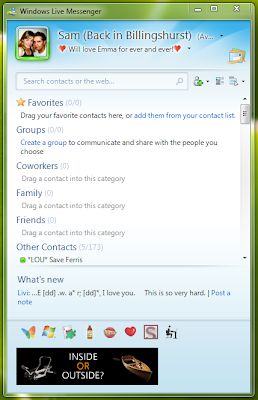
Yes, thats right, out of around 200 of my contacts I can see only 1 person. This is just completely stupid. Fair enough, Microsoft may have a new idea about how we should all organise our contacts, into groups and favourites and whatnot but seriously, the implementation couldn't have been worse. After about 5 minutes of tinkering I was able to make it look like this...
.PNG)
Now I don't know about the rest of you, but this is certainly what I would prefer to see immediatly after instalation. Maybe have a tutorial popup which helps users migrate their contacts to the new group and favourite system? Wouldn't that make more sense? I guess not, afterall what would a 19yr old fresher know about design...
Well as some of you may know, I decided to reformat my PC and install Windows 7 RC to see what improvements had been made since vista (there are many!) but more on that in a later blog post. Anyway, as part of my testing / daily computer tasks I will be using WLM. So i downloaded the web installer and set to work, installation went like a dream so no problems there. The problems start when I run WLM for the first time, I was presented with this...

Yes, thats right, out of around 200 of my contacts I can see only 1 person. This is just completely stupid. Fair enough, Microsoft may have a new idea about how we should all organise our contacts, into groups and favourites and whatnot but seriously, the implementation couldn't have been worse. After about 5 minutes of tinkering I was able to make it look like this...
.PNG)
Now I don't know about the rest of you, but this is certainly what I would prefer to see immediatly after instalation. Maybe have a tutorial popup which helps users migrate their contacts to the new group and favourite system? Wouldn't that make more sense? I guess not, afterall what would a 19yr old fresher know about design...
Friday, May 29, 2009
End of the year...
Well that's it, My first year at university is over! It's gone unbelievably quickly, I mean everyone says when you go, "Make the most of your first year, it'll be over before you know it" and, if you're anything like me, at the time you were just sat there thinking 'I wish it was over right now!'. But honestly, its been a really fantastic year. I've met new people, and actually been able to study what I want for once, instead of having all the government based education shoved in your face!
If there's one thing I haven't totally enjoyed here it's the student halls. Don't get me wrong, i've got great flatmates and i'd probably say one of the happiest flats in Purbeck and it was easy to make friends when I got here. For anyone considering halls for university next year, i will say this: No matter where you get, whether you tick quiet or loud, big or small, there will be noise! Nearly every night, from about 10 until 3-4 in the morning. It's just something you have to get used to!
Now, onto the course. This year, my course has seen record dropout rates, upwards of 50% and I'm pretty sure some people will not be coming back next year. The reason for this, I think, is that my course was advertised totally wrong. It was marketed as a music technology course, which it certainly isn't! How many music technicians do you know that program in C++, are able to tell you (in detail) about the inner workings of a computer, create flash and video based animations, and can recite the OSI and TCP/IP network models (and what they do) off by heart! No, my course is definitely not a music technology course. What it is, is a low level computer science course specialising in aspects of music technology! But the thing is, it turns out that it's the perfect course for me!
I really do think that this course is a great course, but the high drop out show that some people obviously are not happy with it. I really do think that the university should look at this course again, and redefine it! Anyway, moving onto exams...
I had three this year, one earlier in the year on the fundamentals of sound and two more recently; Audio and Video principles, and Media Devices Networks and Architectures. On the whole i feel they went reasonably well, there was one or two small questions on each paper that i wasn't 100% about but I think hope that I managed to answer the main questions in enough detail to get a good mark. I'll let you know when I receive my final grades sometime in June/July how I got on!
Anyway, that's about it as far as my first year at university goes. Check back over the summer for lots more tech related posts, and hopefully a review of my Dell mini 10 netbook (when I get one!)
If there's one thing I haven't totally enjoyed here it's the student halls. Don't get me wrong, i've got great flatmates and i'd probably say one of the happiest flats in Purbeck and it was easy to make friends when I got here. For anyone considering halls for university next year, i will say this: No matter where you get, whether you tick quiet or loud, big or small, there will be noise! Nearly every night, from about 10 until 3-4 in the morning. It's just something you have to get used to!
Now, onto the course. This year, my course has seen record dropout rates, upwards of 50% and I'm pretty sure some people will not be coming back next year. The reason for this, I think, is that my course was advertised totally wrong. It was marketed as a music technology course, which it certainly isn't! How many music technicians do you know that program in C++, are able to tell you (in detail) about the inner workings of a computer, create flash and video based animations, and can recite the OSI and TCP/IP network models (and what they do) off by heart! No, my course is definitely not a music technology course. What it is, is a low level computer science course specialising in aspects of music technology! But the thing is, it turns out that it's the perfect course for me!
I really do think that this course is a great course, but the high drop out show that some people obviously are not happy with it. I really do think that the university should look at this course again, and redefine it! Anyway, moving onto exams...
I had three this year, one earlier in the year on the fundamentals of sound and two more recently; Audio and Video principles, and Media Devices Networks and Architectures. On the whole i feel they went reasonably well, there was one or two small questions on each paper that i wasn't 100% about but I think hope that I managed to answer the main questions in enough detail to get a good mark. I'll let you know when I receive my final grades sometime in June/July how I got on!
Anyway, that's about it as far as my first year at university goes. Check back over the summer for lots more tech related posts, and hopefully a review of my Dell mini 10 netbook (when I get one!)
Tuesday, May 19, 2009
Dell Mini Inspiron 12
The Dell Mini Inspiron 12 has been discontinued, as many of you know i have been looking into netbooks recently, and the inspiron 12 was a fairly new contender in the market, but it has been discontinued. It is no longer available on the Dell UK website, and it has been confirmed with a dell representative. See screen-shots below!

And confirmation from a Dell Representative... (Click images to view full size)

Thought I'd post this, as no one else seems to have!
Sam

And confirmation from a Dell Representative... (Click images to view full size)

Thought I'd post this, as no one else seems to have!
Sam
Monday, May 18, 2009
Assignment Results
Hey All,
Just a quick update as I have some marks back for my assignments. If you remember I uploaded two assignments to my blog recently, a Flash based DSLR tutorial and Two Radio Jingles to promote my course. Anyway, I have just collected the results for both assignments. For the Flash tutorial I got 95% and for the two radio jingles i got 91%. I'm really pleased with these results, and I am still working on the flash tutorial to make it perfect before I release it.
Anyway, That's all for now!
Cheers for reading
Just a quick update as I have some marks back for my assignments. If you remember I uploaded two assignments to my blog recently, a Flash based DSLR tutorial and Two Radio Jingles to promote my course. Anyway, I have just collected the results for both assignments. For the Flash tutorial I got 95% and for the two radio jingles i got 91%. I'm really pleased with these results, and I am still working on the flash tutorial to make it perfect before I release it.
Anyway, That's all for now!
Cheers for reading
Wednesday, May 06, 2009
Electric drums 'vs' Acoustic drums...
Recently there has been an explosion in the number of new electronic drum kits that are coming onto the market. There are many reasons for this, advances in technology is an obvious one, but I can't help feeling that games like Rock Band have encouraged the growth.
Those who know me, will know that I have always been an avid hater of the so called 'electronic drum kits' and have always preferred playing on my old acoustic drums. For those who don't know me, I have been playing drums for nearly 15 years now, so I like to think of myself as an experienced drummer.
Anyway, something strange happened when i moved to university. I brought a Yamaha DTXplorer , which is a pretty popular, standard electronic drum kit. There were a number of reasons behind this choice, mainly there was no way I could get away with a full sized kit in this tiny little university-rented room, but also I think i would have been kicked out before i could even mutter paradiddle.

So, after a few months use a strange thing has happened. I actually really, really like this kit (note the repetition for emphasis!). I mean, it could never compare to an acoustic kit for live performances but it definitely has some advantages for the purposes of practice. The main one being accuracy, acoustic kits are designed so that the drums sound their best when the skin is hit in the very middle of the drum (some snares are an exemption to this rule). The size of the pads on the electric kits force you to do this, and I have found that just this alone has made me a better drummer when I return to my acoustic kit.
Aside from accuracy, the electronic drum kit is much more neighbour friendly than an acoustic kit. The sound of sticks hitting a rubber pad is infinitely quieter than the sound of a drum resonating or a cymbal being hit! Whilst some drummers hate the tactile feel of the sticks on the rubber pads, i have found that it has a hidden advantage. I have found myself being forced to play double strokes properly, rather than being lazy and dragging the sticks, so while at first glance this may seem a hinderance, in the long term it could be improving your technique!
Sure, as with all things, you get what you pay for. Some electric kits are not even worth bothering with, the Alesis DM5 for example (available at around £350), although this is a nice drum module, the pads and stand are worthless! Some electronic kits, such as the Roland TD-20
 (available for around £4,400), do a fantastic job of imitating the classic acoustic kit and sound great at the same time.
As with all electronic kits you get to choose different sound sets for all different styles of music, but you will no doubt return to one or two sound sets that actually sound like drums, and when you do you will be able to truly appreciate the electronic kit for what it is, not only a fantastic practice kit for when noise is a problem but also a tool to help you improve your technique for when you do get the chance to play on an acoustic kit again!
Those who know me, will know that I have always been an avid hater of the so called 'electronic drum kits' and have always preferred playing on my old acoustic drums. For those who don't know me, I have been playing drums for nearly 15 years now, so I like to think of myself as an experienced drummer.
Anyway, something strange happened when i moved to university. I brought a Yamaha DTXplorer
, which is a pretty popular, standard electronic drum kit. There were a number of reasons behind this choice, mainly there was no way I could get away with a full sized kit in this tiny little university-rented room, but also I think i would have been kicked out before i could even mutter paradiddle.
So, after a few months use a strange thing has happened. I actually really, really like this kit (note the repetition for emphasis!). I mean, it could never compare to an acoustic kit for live performances but it definitely has some advantages for the purposes of practice. The main one being accuracy, acoustic kits are designed so that the drums sound their best when the skin is hit in the very middle of the drum (some snares are an exemption to this rule). The size of the pads on the electric kits force you to do this, and I have found that just this alone has made me a better drummer when I return to my acoustic kit.
Aside from accuracy, the electronic drum kit is much more neighbour friendly than an acoustic kit. The sound of sticks hitting a rubber pad is infinitely quieter than the sound of a drum resonating or a cymbal being hit! Whilst some drummers hate the tactile feel of the sticks on the rubber pads, i have found that it has a hidden advantage. I have found myself being forced to play double strokes properly, rather than being lazy and dragging the sticks, so while at first glance this may seem a hinderance, in the long term it could be improving your technique!
Sure, as with all things, you get what you pay for. Some electric kits are not even worth bothering with, the Alesis DM5
for example (available at around £350), although this is a nice drum module, the pads and stand are worthless! Some electronic kits, such as the Roland TD-20 (available for around £4,400), do a fantastic job of imitating the classic acoustic kit and sound great at the same time.As with all electronic kits you get to choose different sound sets for all different styles of music, but you will no doubt return to one or two sound sets that actually sound like drums, and when you do you will be able to truly appreciate the electronic kit for what it is, not only a fantastic practice kit for when noise is a problem but also a tool to help you improve your technique for when you do get the chance to play on an acoustic kit again!
Sunday, April 26, 2009
Flash based DSLR Tutorial...
A simple flash based application to teach users the basics of DSLR photography. This was the brief I was given for a recent assignment on my course. I've been promising for a while to show you a preview of the application, as the hand-in date has now come and gone, I'm free to show you what I've been working on. The best way i guess is to make a little demo video, so thats what i've done. You can see it below (don't forget to hit the 'HQ' version for a higher quality video)...
It'd be great to hear what you think of this, let me know in the comments section. I'm still working on this and hope to eventually upload it somewhere for people to use!
Thats all for now!
It'd be great to hear what you think of this, let me know in the comments section. I'm still working on this and hope to eventually upload it somewhere for people to use!
Thats all for now!
Saturday, April 25, 2009
Dropbox
Just a short post from me tonight, I want to tell you all about this new service called Dropbox. There are only a million or so users, so it's pretty new. I've just discovered it and it seems very nice indeed. It is essentially a free online file syncing application which integrates into your Mac, PC, or Linux operating system very nicely (see screenshot below).

What's more, it has an iPhone web interface. Which is great, you can check your files on the move, and even re-arrange and re-organise files. This service is just perfect, say if you had a netbook for taking notes in lectures, you could save them to your Dropbox file, and instantly have them on your home PC. No need to worry about external drives or USB pens, or file syncing programs.
I highly recommend you download this, there is no reason not to, even if you just end up using it for a simple online backup service.
- Download Dropbox Now
Thursday, April 16, 2009
BBC Reveal new superhero!
It looks like the BBC have decided the time is right for a new super hero to be unleashed onto the world. I made this shocking discovery just the other day, right on the BBC News home page. Take a look for yourself...
 Can't see it yet, well I took the liberty of enlarging the image for you. Specifically the part containing the new super-hero's name and mugshot! See for yourself...

Behold... ALLERGY BOY!! Surprisingly though, the BBC have decided to reveal our new heros one weakness. The humble banana!
On a more serious note, I would like to mention that this post is in no way meant to cause offence to the aforementioned individual. However it is meant to highlight the shocking way in which the BBC have stereotyped this young man, firstly referring to him as the singular masculine 'boy', and secondly affixing the determiner 'Allergy' to the front of it! Surely this is not quite PC as they say nowadays!?
On an even more serious note, I am back to university this sunday, and have a few assignments due in next week which means that I will be able to upload some of my work. Including (finally) my flash based tutorial for new DSLR Camera users, as well as a couple of radio advertisements made for my course!
Anyway, thats all for now. I hope you'll excuse my random outburst about Allergy Boy, but i felt something needed to be said!


Behold... ALLERGY BOY!! Surprisingly though, the BBC have decided to reveal our new heros one weakness. The humble banana!
On a more serious note, I would like to mention that this post is in no way meant to cause offence to the aforementioned individual. However it is meant to highlight the shocking way in which the BBC have stereotyped this young man, firstly referring to him as the singular masculine 'boy', and secondly affixing the determiner 'Allergy' to the front of it! Surely this is not quite PC as they say nowadays!?
On an even more serious note, I am back to university this sunday, and have a few assignments due in next week which means that I will be able to upload some of my work. Including (finally) my flash based tutorial for new DSLR Camera users, as well as a couple of radio advertisements made for my course!
Anyway, thats all for now. I hope you'll excuse my random outburst about Allergy Boy, but i felt something needed to be said!
Tuesday, April 07, 2009
Pro Tools vs Cubase
This is a topic I've been meaning to cover for a long time now. So far I have held back because I felt that I was not experienced enough with Pro Tools to make a fair comparison. This is a short post about the differences between two popular pieces of DAW (Digital Audio Workstation) software; Digidesign's Pro Tools and Steinberg's Cubase
 . There are many other DAW software for you to choose from, for example Logic Studio
 (Mac), Audacity (PC + Mac + FREE), Ableton Live
 (PC + Mac), Garage Band (Mac + Free), and more. All of these systems are good at slightly different things. The reason I have chosen Pro Tools and Cubase is because these are the two most significant systems new music technicians are likely to come across.


and Steinberg's Cubase. There are many other DAW software for you to choose from, for example Logic Studio (Mac), Audacity (PC + Mac + FREE), Ableton Live (PC + Mac), Garage Band (Mac + Free), and more. All of these systems are good at slightly different things. The reason I have chosen Pro Tools and Cubase is because these are the two most significant systems new music technicians are likely to come across.Cubase is used quite a lot in the education system, this is because it provides a fairly advanced set of features and will run 'fairly' well on a relatively cheap PC (for smaller recording tasks!). Pro Tools is regarded as the industry standard and is used in most professional studios. A few days ago I discussed the differences between Mac and PC for music technology, well both of these systems can be run on either Mac or PC, however Pro Tools tends to be run mainly on Mac, whilst Cubase tends to be run on a PC.
The interfaces look very similar (Even more so since the Pro Tools 8 Upgrade), as you can see below...

Pro Tools 8 running on a Mac

Cubase 4 running on a PC
In fact the differences can really be summarised in one sentence. Think of Pro Tools as audio recording software with MIDI (Musical Instrument Digital Interface) built in, and Cubase as a MIDI sequencer with audio recording functions built in. Whilst this may be changing considerably in the near future with the release of Cubase 5, for now Pro Tools certainly is a more comprehensive piece of software for audio recording purposes.
Cubase makes it really easy to plug in a MIDI device, and route it through a VSTI (Virtual Studio Technology Instrument) of your choice to create a MIDI track. It comes pre-installed with many different VSTI's as well as other VST plugins, like reverberation, noise gates, compressors, and more. Pro Tools also comes installed with a multitude of VST plugins however these are almost all focused on manipulating audio files, rather than MIDI input. It is worth noting that there are literally hundreds of VST plugins available from third party companies, ranging from thousands of pounds, to free. An interesting point here is that there tend to be less free plugins for Mac users running Pro Tools, as these plugins tend to be geared towards the professional market and are often of a much higher quality than some of their PC counterparts.
Then comes the issue of cost, and inevitably licensing issues. Cubase requires an external USB dongle to act as a registration key before the software will open. In a similar way Pro Tools will only run when connected to certain sound cards. You can buy sound cards by Digidesign (The company behind Pro Tools) or you can buy a special version of Pro Tools to run on certain M-Audio sound cards . I find Pro Tools is more advanced in this respect because (depending on which sound card you have) it actually uses the sound card to process some of the VST plugins, rather than depending totally on the CPU in the computer.
. I find Pro Tools is more advanced in this respect because (depending on which sound card you have) it actually uses the sound card to process some of the VST plugins, rather than depending totally on the CPU in the computer.If you buy a sound card from Digidesign, you get a copy of Pro Tools LE for free. This is all that most home users and students will require. I personally recommend the Digidesign Mbox 2 Mini  as it can be brought for around £200 . Cubase comes with its own protection dongle and will run on almost any sound card, a single licence for Steinberg Cubase 4 Essential
 will cost around £125, but it is worth noting that this is not the most recent edition. You will pay around £320 for Cubase 5
 , the latest edition of the software. It is up to you to decide whether you really need the latest and greatest features.
Essentially, both these systems perform the same tasks. If you are looking to get into the recording industry, then i suggest you get familiar with Pro Tools. If you are just looking to record a bit of stuff at home and play around with MIDI, then cubase is the way forward.
as it can be brought for around £200 . Cubase comes with its own protection dongle and will run on almost any sound card, a single licence for Steinberg Cubase 4 Essential will cost around £125, but it is worth noting that this is not the most recent edition. You will pay around £320 for Cubase 5, the latest edition of the software. It is up to you to decide whether you really need the latest and greatest features.Essentially, both these systems perform the same tasks. If you are looking to get into the recording industry, then i suggest you get familiar with Pro Tools. If you are just looking to record a bit of stuff at home and play around with MIDI, then cubase is the way forward.
Thursday, April 02, 2009
Spotify the future...
In my last post I talked about the differences between Mac's and PC's on a music technology basis. Now I'd like to talk about a revolutionary new way to distribute music, available for both Mac and PC.
Introducing Spotify, a free Ad based music system. The idea is simple: don't buy music but don't steal it either. Spotify is a totally legal way of listening to any music you want on your computer for free. Spotify has an iTunes like interface as you can see below.

The creators of Spotify have signed deals with all the major record labels, which means pretty much all mainstream music is available. In addition to this, searches for some very obscure music have also been successful. Spotify is available for free, or with several paid options. The only difference is that the free version is Ad supported, and you will get a 10 second advert played for every 6 tracks you play on average. This is how Spotify generates income to pay the royalties and costs to the record labels.
The reason I'm blogging about this, is because as a future music technician my job will rely on the music industry, and at the moment the industry is being torn apart by music piracy. Spotify is the perfect example of where i think music distribution should be going. The industry needs to realise that whilst profits are important, there are modern ways of distributing the content to end users, and these should be used more!
Spotify is similar to last.fm but has the advantage of being a standalone program, so you do not need a browser window open to listen to the music and with Spotify you are able to create playlists of specific tracks, rather than simply based on a certain genre.
An obvious limitation of Spotify is that you must be online to listen to the music, and that you cannot download the tracks to put on your iPod or other portable media player. There are rumours that a Spotify iPhone app is in the works which will allow users to stream music from Spotify on their phone, but as with the recently released Skype iPhone app, it is likely that this will not be allowed to utilise the 3G network.
Spotify started as an invite only service, but now anyone from the United Kingdom can sign up for a free Spotify account. I strongly urge everyone to use this service, because the more people that listen to the adverts, the more money the music industry will get, and as a result maybe they will look at other ways of distributing music, that are cheaper for us as the final consumer.
Introducing Spotify, a free Ad based music system. The idea is simple: don't buy music but don't steal it either. Spotify is a totally legal way of listening to any music you want on your computer for free. Spotify has an iTunes like interface as you can see below.

Spotify's main interface
The creators of Spotify have signed deals with all the major record labels, which means pretty much all mainstream music is available. In addition to this, searches for some very obscure music have also been successful. Spotify is available for free, or with several paid options. The only difference is that the free version is Ad supported, and you will get a 10 second advert played for every 6 tracks you play on average. This is how Spotify generates income to pay the royalties and costs to the record labels.
The reason I'm blogging about this, is because as a future music technician my job will rely on the music industry, and at the moment the industry is being torn apart by music piracy. Spotify is the perfect example of where i think music distribution should be going. The industry needs to realise that whilst profits are important, there are modern ways of distributing the content to end users, and these should be used more!
Spotify is similar to last.fm but has the advantage of being a standalone program, so you do not need a browser window open to listen to the music and with Spotify you are able to create playlists of specific tracks, rather than simply based on a certain genre.
An obvious limitation of Spotify is that you must be online to listen to the music, and that you cannot download the tracks to put on your iPod or other portable media player. There are rumours that a Spotify iPhone app is in the works which will allow users to stream music from Spotify on their phone, but as with the recently released Skype iPhone app, it is likely that this will not be allowed to utilise the 3G network.
Spotify started as an invite only service, but now anyone from the United Kingdom can sign up for a free Spotify account. I strongly urge everyone to use this service, because the more people that listen to the adverts, the more money the music industry will get, and as a result maybe they will look at other ways of distributing music, that are cheaper for us as the final consumer.
Tuesday, March 31, 2009
Mac vs PC for Music Technology...
This is going to be an Mac vs PC comparison with a difference. I will focus on the differences between the two system within a music technology environment. Both have certain advantages and disadvantages and regardless of my opinion, which OS you choose is inevitably your decision. I own a MacBook pro running Leopard 10.5.6 as well as a home built desktop machine running Vista SP2. The specifications of these two machines are pretty much the same, so this is really about the operating system.
A digital audio workstation (DAW) requires multiple channels of audio both in and out of the machine. It also requires a lot of processing power and RAM to add effects to channels and tracks. Most professional recording studios today use Macs, they have become the de-facto standard alongside the popular DAW software ProTools. To find out why, we need to start at the very basics of the operating system. The two screenshots below show a Vista desktop and a Leopard desktop.


A digital audio workstation (DAW) requires multiple channels of audio both in and out of the machine. It also requires a lot of processing power and RAM to add effects to channels and tracks. Most professional recording studios today use Macs, they have become the de-facto standard alongside the popular DAW software ProTools. To find out why, we need to start at the very basics of the operating system. The two screenshots below show a Vista desktop and a Leopard desktop.

Vista Desktop

Leopard Desktop
We can see the two systems have the same basic features, Both have a file system with folders set up for all kinds of different multimedia. Both can run a multitude of DAW software, and both can record and process audio. The one fundamental difference is that Apple have always built their machines to work with multimedia, from the hardware to the software. Every single step has been optimised for digital media manipulation. The way the unix operating system is run in leopard means that if one application crashes, the whole system doesn't crash. For a studio engineer this potentially saves a lot of time, and you know what they say; time is money!
Users will argue that windows accepts more hardware, that if you buy an external sound card it is more likely to work on Windows than on a Mac. Whilst this may have been the case many years ago, it certainly is not now. Apples slogan "it just works" really does mean that today most external sound cards will work on a Mac even easier than they will on a PC, many do not even require additional drivers due to apples core audio drivers.
Windows has the advantage of having a larger user base, this means that there are potentially more VST plugins for DAW software running on a windows machine, but is this necessarily a good thing? The VST's that are available for Mac are generally more polished and of a better quality than some available for the PC, perhaps because it is assumed that Macs are for professionals. This is not to say that all the software for Windows is of a lower quality than its Mac counterparts. Take Cubase and ProTools for example, both these pieces of software boast Mac and PC compatibility. This suggests that there is a significant market still for DAW software running on windows.
Macs have always been marketed as easy to use computers; the mouse only has one button because of Apples design philosophy that everything a user could ever possibly want to do, should only be a mouse click away. The menu for each program on a Mac appears in the same bar across the top of the screen, this follows the fundamental design principles that controls should be consistent in their placement. The applications that you use everyday are contained within a system wide dock, viewable from any application (No need to navigate the start menu like in Windows). All these things may seem like minor tweaks, but there are enough 'minor tweaks' in Leopard to make it seem much more intuitive than a windows system.
Then there is the issue of cost, the Mac/PC price difference is something that has been debated for years, and is not something I'm going to discuss. However, it is possible to buy a PC with fairly decent specifications cheaper than an equivalent Mac. But, in the time I have owned my mac, i have had to reinstall windows twice on my desktop machine. I have not had a single problem on my mac.
So my conclusion is this, it is perfectly possible to record, and produce music on a windows machine using pretty much the same basic software. However if you want a solid system that will not crash, will consistently boot quickly, and will generally run circles around a windows machine, get a Mac!
Subscribe to:
Posts (Atom)